



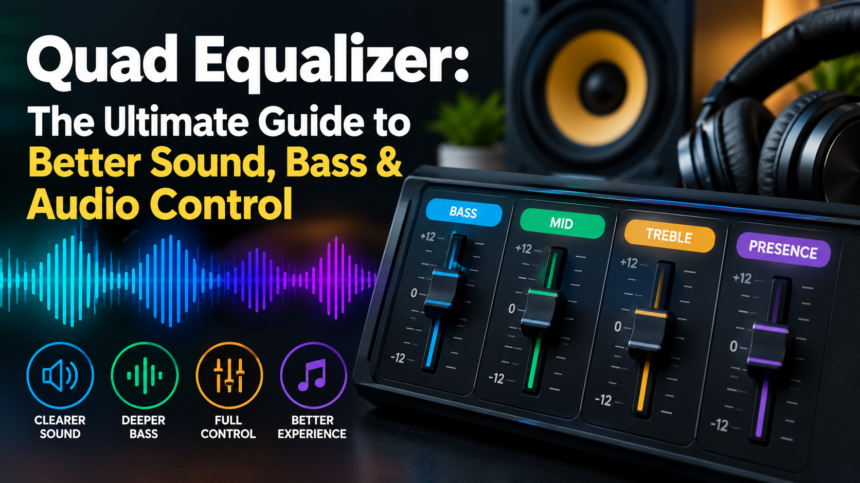
A quad equalizer is an audio tool that divides sound into four adjustable frequency ranges, giving you better control over bass, midrange, treble, and overall sound balance. It can help customize music, movies, gaming, and voice audio to match your headphones, speakers, and personal listening preferences.
Introduction
Good audio is not simply about turning the volume up. The quality and balance of sound can change dramatically depending on the headphones, speakers, source material, room, and settings being used. This is why equalization has become an important feature in many audio applications and devices. A quad equalizer provides a simple way to adjust different parts of the sound spectrum without requiring users to understand complicated professional audio equipment. By controlling several frequency ranges independently, listeners can make music, movies, games, podcasts, and other content sound more suitable for their equipment and personal preferences. Instead of relying completely on a factory sound profile, users can make small adjustments to bass, midrange, and treble characteristics. When used carefully, an equalizer can help create a more balanced and enjoyable listening experience while avoiding unnecessary distortion or excessive processing.
What Is a Quad Equalizer?
A quad equalizer is an audio equalization system that divides the sound spectrum into four adjustable frequency sections. The exact frequency ranges depend on the particular software, amplifier, speaker system, car stereo, music application, or other audio equipment. Some systems may organize the controls around bass, low-midrange, high-midrange, and treble, while others may use different frequency points. The purpose remains essentially the same: give the listener control over separate portions of the audio signal. Increasing a frequency band makes that part of the sound more prominent, while reducing it makes that frequency range less noticeable. This makes a four-band equalizer relatively straightforward compared with advanced equalizers that can contain many bands and technical controls. For beginners, this simpler design can be useful because it provides meaningful control without creating an overwhelming number of sliders and settings.
How Does a Quad Equalizer Work?
To understand how a quad equalizer works, it helps to understand that audio contains a wide range of frequencies. Low frequencies are associated with bass and the sense of depth or impact, while middle frequencies carry much of the information found in voices and many musical instruments. Higher frequencies contribute to brightness, crispness, and fine detail. A quad equalizer allows these broad areas to be adjusted independently. When a particular band is boosted, the system increases the relative level of frequencies within that section. When it is reduced, those frequencies become less prominent in the overall mix. The result is a change in tonal balance rather than the creation of completely new sounds. This distinction is important because EQ cannot repair every audio problem. It is mainly a tool for shaping existing sound and compensating for differences between recordings, playback equipment, listening environments, and personal preferences.
Understanding the Four Frequency Controls
The four controls on an equalizer can have different names depending on the device, but they generally cover different portions of the frequency spectrum. The lowest control usually influences bass, which affects drums, bass guitars, electronic effects, and other low-frequency elements. The next controls commonly affect the lower and upper midrange, where vocals, guitars, keyboards, dialogue, and many other important sounds are located. The highest control generally affects treble, which influences brightness and high-frequency detail. Because these ranges overlap with many sounds at the same time, changing one control can affect the overall character of a recording. For example, increasing the midrange may make vocals more noticeable, but pushing it too far can make the sound feel aggressive. Likewise, increasing treble may add clarity but can make certain recordings sound harsh. Understanding these relationships is more useful than simply copying a preset without knowing what each adjustment does.
Bass Control and Low Frequencies
Bass is one of the most noticeable parts of an audio profile, especially for listeners who enjoy electronic music, hip-hop, cinematic soundtracks, rock, or other genres with strong low-frequency elements. Increasing the bass range can give music more weight and impact, making drums and bass instruments feel stronger. However, more bass does not automatically mean better sound. Excessive low-frequency boosting can make audio muddy and may hide vocals, instruments, and other details. It can also expose limitations in small speakers or headphones that are not designed to reproduce very deep frequencies at high levels. A better approach is to make modest adjustments and then listen carefully to familiar tracks. If the sound becomes boomy or loses definition, the bass boost has probably gone too far. In many cases, a small adjustment is enough to create a fuller presentation without sacrificing clarity.
Midrange Control and Vocal Clarity
The midrange is particularly important because a large amount of musical and spoken content exists within this area. Vocals, guitars, piano, dialogue, and numerous other instruments can be strongly affected by midrange adjustments. If vocals sound distant or difficult to understand, a careful increase in an appropriate midrange area may make them more present. On the other hand, excessive midrange can make recordings sound crowded, nasal, or aggressive. The two middle controls on a quad equalizer can therefore be useful for making more specific changes than a simple bass-and-treble control. When adjusting them, it is best to use familiar songs, conversations, or movie dialogue as reference material. Make one change at a time and listen for whether the intended improvement actually occurs. This method makes it easier to understand what each adjustment is doing and reduces the risk of creating an unnatural sound profile.
Treble Control and Sound Detail
Treble influences the upper portion of the frequency range and can contribute to the perception of brightness, clarity, air, and detail. Increasing treble may make cymbals, certain vocal details, acoustic instruments, and other high-frequency elements more noticeable. However, excessive treble can quickly make an audio system sound sharp or tiring. This is particularly noticeable with recordings that are already bright or with headphones that naturally emphasize higher frequencies. If your audio sounds harsh, reducing the upper range slightly may produce a smoother listening experience. It is also important to remember that perceived detail is not the same as simply increasing high frequencies. A balanced recording can already contain plenty of detail without requiring significant treble enhancement. The goal should be to create a comfortable and natural presentation rather than maximizing every available frequency.
Why Use a Quad Equalizer?
There are several reasons people use a four-band equalizer. One of the biggest advantages is customization. Different headphones and speakers have different tonal characteristics, and listeners also have different preferences. An equalizer can help users adjust the sound so it better suits their equipment and listening habits. It can also be useful when switching between different types of content. A setting that works well for music may not be ideal for spoken-word content, movies, or games. A quad equalizer gives users enough flexibility to make these changes while remaining relatively simple to understand. It can also be helpful when a recording sounds slightly too bass-heavy, too bright, too thin, or difficult to understand. Rather than changing the entire audio system, users can experiment with specific frequency ranges to find a more comfortable balance.
Quad Equalizer Settings for Music
There is no single setting that can be called the perfect EQ profile for every type of music. Recordings are mixed differently, headphones have different frequency responses, and listeners have different preferences. A sensible starting point is therefore a relatively flat or neutral setting. From there, small changes can be made based on what sounds missing or excessive. Bass-heavy music may benefit from a modest low-frequency adjustment, while vocal-focused recordings may require greater attention to the midrange. Acoustic music often benefits from preserving natural balance rather than applying extreme boosts. It is also useful to test several familiar songs instead of judging an EQ profile from a single track. If a setting sounds good across different recordings, it is more likely to be genuinely useful rather than simply matching the characteristics of one particular song.
Quad Equalizer for Movies, TV and Gaming
Movies, television programs, and games contain a mixture of dialogue, music, environmental effects, explosions, footsteps, and background sounds. Because of this variety, the most useful EQ profile can depend on what you are watching or playing. For movies and television, dialogue clarity may be a priority, so an appropriate midrange adjustment can sometimes make speech easier to follow. In games, different sound elements may compete for attention, and excessive bass can sometimes make the overall mix feel crowded. However, there is no universal gaming or movie EQ that works for every title. Audio designers use different mixes, and playback equipment also varies considerably. A balanced profile is usually a sensible starting point, after which small adjustments can be made according to the specific problem you hear. Avoid making extreme changes simply because a preset claims to deliver a particular result.
How to Create a Balanced EQ Profile
Creating a balanced profile is easier when you approach the process gradually. Begin with the equalizer at its neutral position and choose audio that you know well. Listen for a specific problem rather than trying to change everything at once. If the bass feels weak, make a small low-frequency adjustment and listen again. If voices seem unclear, focus on the relevant midrange instead of increasing the entire volume. If the audio sounds dull, a small treble adjustment may be worth testing. After every change, compare the result with the original setting. Keeping the listening volume similar during this comparison is important because louder sound can sometimes appear more impressive even when it is not actually more balanced. The goal should be to make the smallest adjustment that solves the problem. Once you find a profile that works well across several types of content, you can save it as a personal preset if your software or device supports that feature.
Common Quad Equalizer Mistakes
One of the most common EQ mistakes is pushing every control upward. Although this can make the overall sound louder and more energetic, it does not necessarily improve quality. Another common mistake is using an extreme bass boost on equipment that cannot reproduce very low frequencies cleanly. This can result in distortion, muddiness, or an unbalanced presentation. Excessive treble can create harshness, while aggressive midrange adjustments can make vocals and instruments sound unnatural. Another problem is copying an EQ setting from the internet without considering the equipment it was created for. Headphones, speakers, amplifiers, rooms, and recordings all behave differently, so a preset that works well for one setup may sound poor on another. Finally, changing too many controls at once makes it difficult to understand what actually improved the sound. Small, controlled adjustments are usually much easier to evaluate.
Benefits and Limitations of a Quad Equalizer
A quad equalizer offers a useful balance between simplicity and control. Its main benefit is that it gives users more flexibility than basic tone controls while remaining easier to understand than highly advanced multi-band systems. It can help customize bass, midrange, and treble characteristics and may make certain recordings more comfortable or enjoyable. It is also useful for adapting sound to different headphones, speakers, and types of content. However, there are limitations. A four-band EQ cannot provide the same precision as a professional parametric equalizer with numerous adjustable frequency points and bandwidth controls. It also cannot fix every hardware or recording problem. If speakers are damaged, headphones have severe limitations, or the original recording contains unwanted noise, EQ may have limited value. In addition, excessive adjustments can reduce sound quality rather than improve it. The best results come from using EQ as a fine-tuning tool rather than expecting it to solve every audio issue.
Conclusion
A quad equalizer is a practical audio-control tool for people who want more flexibility over the way their music, movies, games, podcasts, and other content sound. By dividing audio into four adjustable frequency areas, it provides a straightforward method for changing bass, midrange, and treble characteristics without requiring the complexity of a professional multi-band system. The most effective approach is to begin with a neutral profile, identify a specific issue, and make small adjustments rather than dramatically changing every control. Whether you want stronger bass, clearer vocals, smoother treble, or a more balanced overall presentation, careful experimentation can help you find a profile that suits your equipment and listening preferences. Ultimately, good EQ is about balance and control, not simply making every part of the audio louder or more powerful.
Frequently Asked Questions
1. What Is a Quad Equalizer?
A quad equalizer is an audio tool that divides sound into four adjustable frequency ranges, giving users greater control over bass, midrange, and treble.
2. What Are the Best Quad Equalizer Settings?
The best settings depend on your headphones, speakers, audio source, and personal preference. Starting with a neutral profile and making small adjustments is a good approach.
3. Can a Quad Equalizer Improve Bass?
Yes, it can increase the presence of low-frequency sound. However, excessive bass boosting may make audio muddy or introduce distortion.
4. Is a Quad Equalizer Useful for Gaming?
Yes. It can help customize game audio by adjusting different frequency ranges, although the ideal settings depend on the game and your audio equipment.
5. Does a Quad Equalizer Improve Audio Quality?
An equalizer changes the balance of frequencies rather than increasing the original technical quality of a recording. Proper adjustments can, however, make the audio sound more balanced and enjoyable.